
Best Stock Screener for Free: What You Can Do Without Paying
 By Darlene Aberin Updated
Finding the best stock screener for free does not mean settling for a toy. Several of the strongest retail research platforms let investors filter thousands of companies, compare valuation and growth metrics, build watchlists, and review price behavior before paying for anything.
The tradeoff is usually depth rather than access. Free plans may limit saved screens, historical financials, exports, alerts, or real-time data, while still providing enough to build a disciplined stock-selection process.
For 2026, Finviz, Yahoo Finance, Koyfin, TradingView, and Stock Analysis each offer a credible free starting point. The best stock screener for free depends on whether an investor values screening speed, global coverage, charting, fundamental depth, or a clean path into company research. Pricing and plan details below were checked on each provider's own pages on October 15, 2026.
Key Takeaways
- Finviz remains one of the fastest free screeners for U.S. stocks listed on the NASDAQ, NYSE, and AMEX.
- Yahoo Finance's screener states that its coverage spans 50 regions and shows more than 10,000 results in its default U.S. view.
- Koyfin's free plan includes 2 years of financials and 1 year of estimates before an upgrade is needed.
- TradingView is strongest when screening needs to connect directly with technical charts.
- Stock Analysis offers free screening and broad company data, with Pro at $79 per year or $9.99 per month.
- A free screener is enough for many investors when the goal is finding candidates rather than automating a full research workflow.
- Paying becomes useful when deeper history, exports, real-time data, or larger watchlists save recurring research time.
What a Free Stock Screener Should Help You Do
The value of a screener comes from reducing a large market into a manageable research list. That requires more than a price filter.
At minimum, a free screener should let an investor narrow companies by several dimensions at once, such as valuation, growth, profitability, market capitalization, industry, and price behavior. The exact mix depends on the investment style, but a single filter rarely produces a useful list on its own.
A low P/E ratio is a good example. It becomes more informative when paired with profitability, debt, growth, and cash-flow measures. That is why stock screener metrics work best when several factors point the same way rather than one ratio driving the entire screen. What follows the screen is stock analysis fundamentals: reading the statements and testing the valuation.
How to Judge the Best Stock Screener for Free
Feature lists make every free plan look similar. A more useful test is to ask what each tool does at the moment a screen returns a list of companies.
Coverage and Universe
Some screeners cover only U.S.-listed stocks, while others reach across dozens of countries. An investor who holds only U.S. companies may never notice the difference. One who wants to compare a U.S. company with a European or Asian peer will run into the limit quickly.
Filter Depth and Definitions
The number of filters is less important than how clearly each one is defined. Two tools can both offer a "P/E" filter while using different earnings figures. A good free screener explains its definitions, so the investor knows what a result really means.
The Path From Screen to Research
A screen is only the first step. The best stock screener for free makes it easy to open a company, review several years of financial statements, and check the chart without switching tools. Every extra step slows the research process down.
Finviz Is the Strongest Free Option for Fast U.S. Screening
Finviz is designed around rapid filtering. Its screener combines descriptive, fundamental, and technical criteria and updates results as filters change.
The free version covers the core workflow without a subscription. According to the Finviz screener documentation, its stock universe covers companies listed on the NASDAQ, the New York Stock Exchange, and the American Stock Exchange.
What the Free Version Does Well
Finviz makes it easy to move from a broad universe to a focused list in a few minutes. Results connect to maps, news, charts, insider data, and compact company pages. That combination is useful when the first goal is discovery rather than detailed valuation work, and it keeps the early research stage quick.
What Requires Elite
According to Finviz's Elite page, the paid plan adds real-time data, advanced screener filters, alerts, data exports, and 8 years of financial statements instead of 3. Elite costs $39.50 per month or $299.50 per year. The free plan remains useful for investors who screen occasionally and do deeper research elsewhere.
Yahoo Finance Gives Free Screening Across 50 Regions
Yahoo Finance has expanded its screener into a broader global tool. Its equity screener states that its coverage spans 50 regions, and the default U.S. view shows more than 10,000 results.
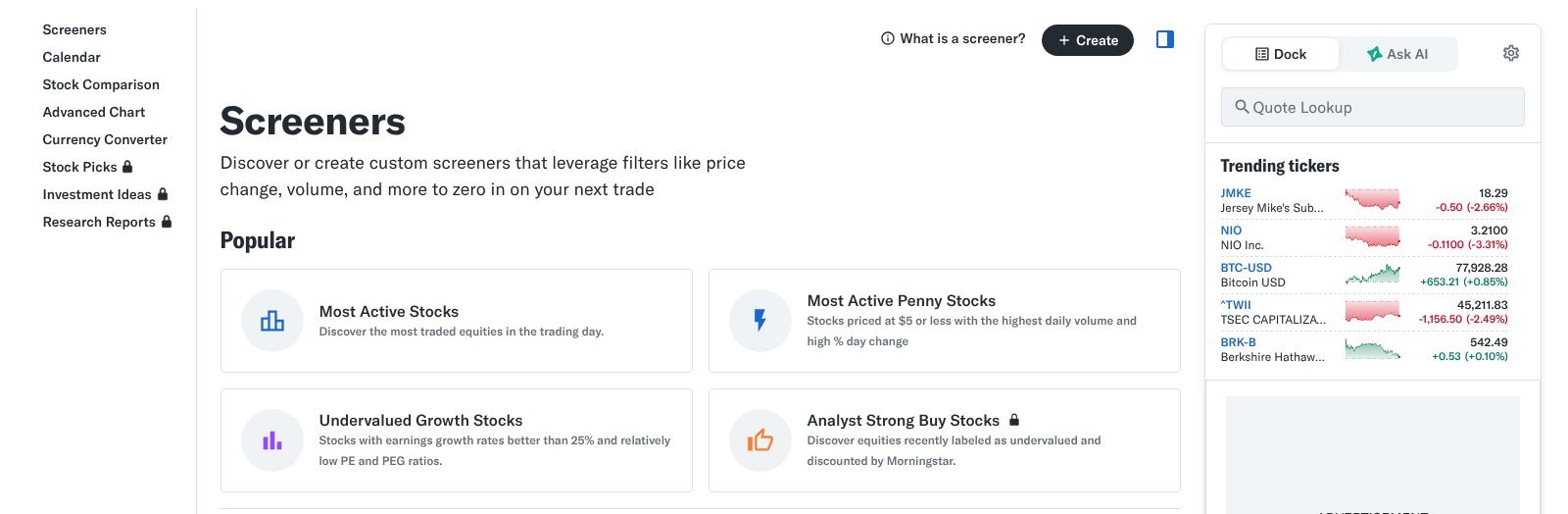
Users can filter by region, market capitalization, price, sector, industry, and index, and switch between a table view and a heatmap view.
Why Yahoo Finance Works Well for Beginners
Yahoo Finance has a low learning curve because screening connects to quotes, news, historical prices, financial statements, and watchlists. The platform also lists predefined screens, including undervalued growth stocks, most shorted stocks, small-cap gainers, and analyst strong buys. These give newer investors working examples of how filters combine.
Where the Free Experience Is Less Specialized
Yahoo Finance does not offer the same depth of screening customization as specialist platforms. Its advantage is breadth and accessibility rather than complex screening logic. Paid tiers start at $95.40 per year for Bronze, which works out to $7.95 per month, and add more data and tools.
Koyfin Adds Fundamental Context to Screening
Koyfin is useful when an investor wants the screen to lead directly into fundamental research, with financial statements, estimates, and charts in one workspace.
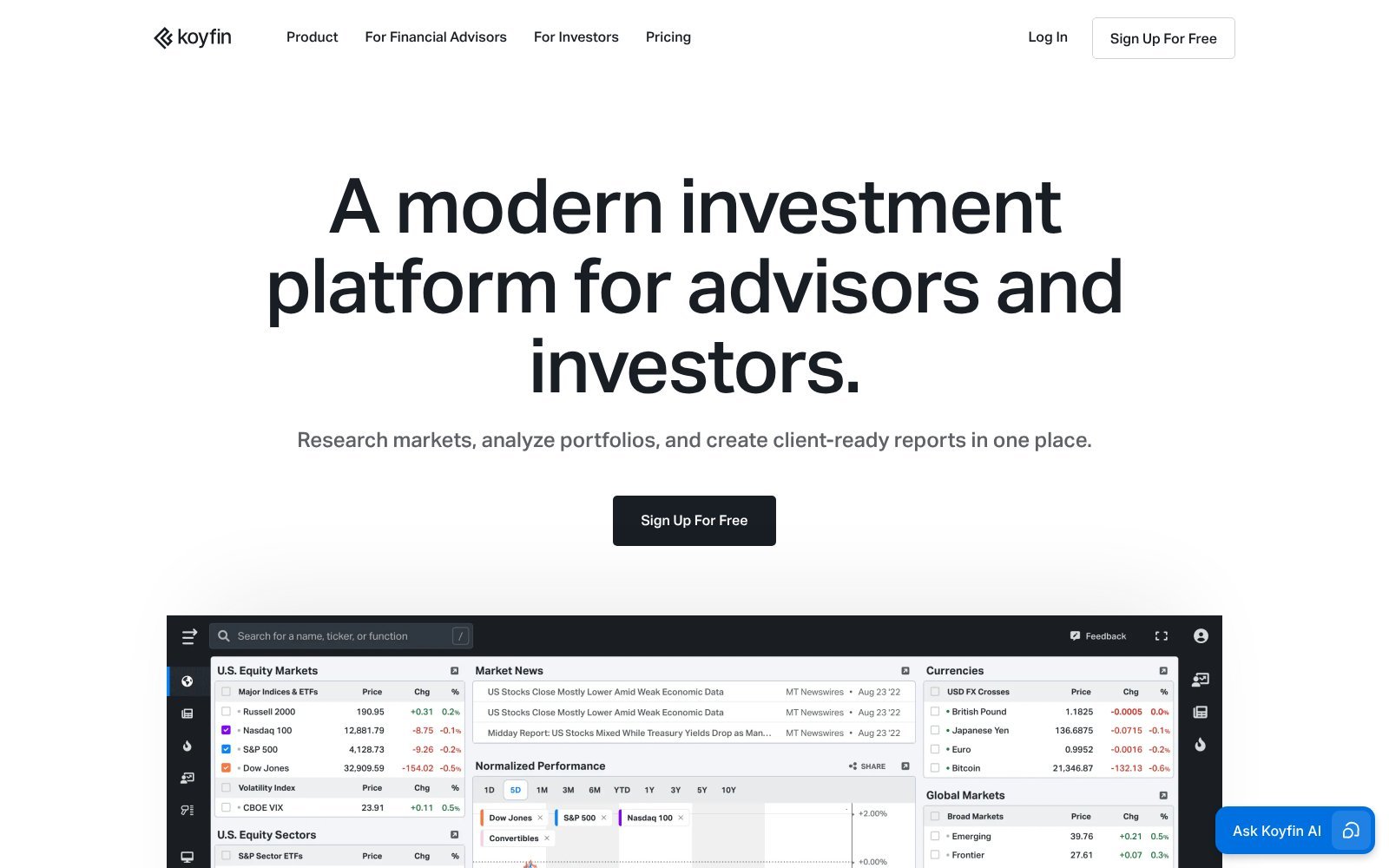
Its free plan includes 2 years of financial data and 1 year of estimates, with limited screens and dashboards. The Plus plan, at $39 per month on annual billing, raises that to 10 years of financials and estimates with unlimited screens and watchlists.
Why Koyfin Is Different
Koyfin's strength is not simply the number of filters. The platform makes it easy to move from a screen into company financials, estimates, peer comparisons, dashboards, and macro data. That makes the free plan a sensible way to test whether a more institutional-style workspace fits an investor's process before paying.
The Free-Tier Constraint
The main limitation is scale. Two years of financial history is enough for a quick check but not for judging how a business performed through a full economic cycle. Investors who need longer histories, more screens, or larger watchlists will meet the paid-plan boundaries quickly.
TradingView Is the Best Free Screener for Chart-Driven Investors
TradingView approaches screening from the technical side. Its free Basic plan connects screening with charts, indicators, price structure, and volume, so a filtered stock can be checked visually in seconds.
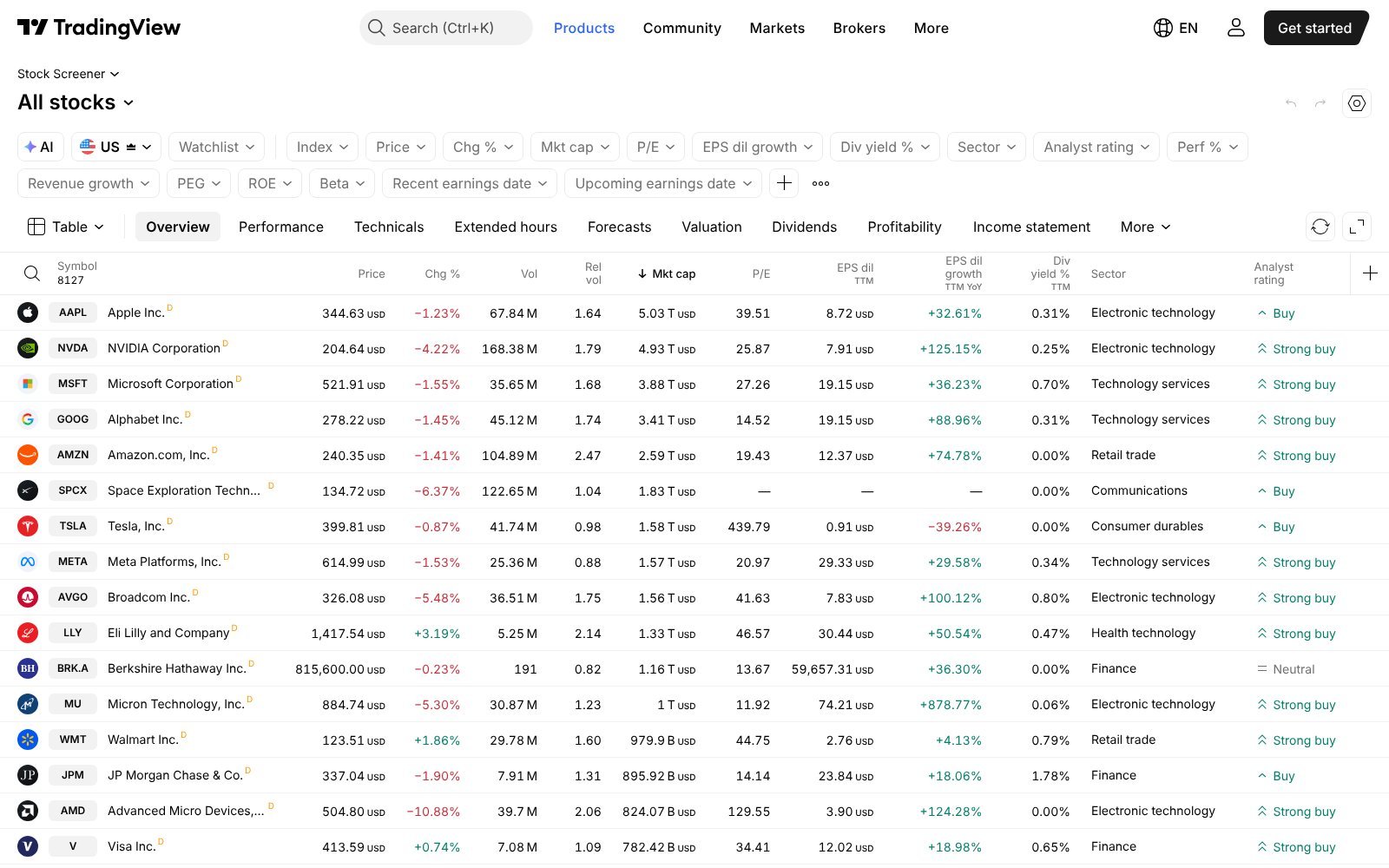
That makes it useful for investors who filter stocks and then immediately want to inspect the chart.
Why the Workflow Is Efficient
A technical screen is more useful when the chart is one click away. A breakout filter, moving-average condition, or volume signal can be checked visually instead of treated as a standalone number. That shortens the time between spotting a pattern and deciding whether it deserves closer study.
The Main Limitation
The free plan limits chart layouts, indicators per chart, and alerts. According to TradingView's pricing page, the Essential plan costs $12.95 per month on annual billing. Investors who depend on several charts and alerts at once may eventually need a paid tier.
Stock Analysis Offers a Strong Free Fundamental Starting Point
StockAnalysis.com covers stocks, ETFs, financial statements, forecasts, analyst data, corporate actions, and screening in a clean, data-heavy interface.
Its paid Pro plan costs $79 per year, or $9.99 per month. Pro expands access to 10 to 40 years of financial history, saved screeners, up to 100 active alerts, one download per day to Excel, CSV, or Google Sheets, and more than 300 indicators in its data tables.
Why the Free Version Is Useful
The free experience suits investors who prefer company fundamentals over complex charting. Company pages are detailed, and screening leads straight into financial statements and valuation data. For many long-term investors, that is the most direct route from a list of names to a first look at the numbers.
When Pro Becomes Useful
The paid plan makes more sense when long historical series, downloads, saved screens, or alerts become part of a recurring process. Ten or more years of statements make it much easier to see how a company handled earlier downturns, which a short free history cannot show.
Free Stock Screeners Compared
Each platform emphasizes a different part of the research process, so the most useful comparison is by workflow rather than by raw feature count.
| Platform | Best Free Use | Coverage | Technical Strength | Fundamental Depth | Entry Paid Plan |
|---|---|---|---|---|---|
| Finviz | Fast U.S. screening | U.S. listed stocks | Strong | Moderate | $299.50/year |
| Yahoo Finance | Broad general screening | 50 regions | Moderate | Moderate | $95.40/year |
| Koyfin | Fundamental workflow | Global | Moderate | Strong | $39/month, billed annually |
| TradingView | Technical screening | Global | Very strong | Moderate | $12.95/month, billed annually |
| Stock Analysis | Company fundamentals | Global | Moderate | Strong | $79/year |
Pricing was checked on each provider's pages on October 15, 2026. Plans and promotions change, so the checkout page is the final word.
Which Free Screener Fits Different Investors?
The best stock screener for free depends on which part of research an investor wants to make faster.
Fast U.S. Stock Discovery
Finviz is the most efficient choice when the goal is quickly filtering U.S. stocks. Its filters respond instantly, and results link straight to charts, news, and insider data. An investor can test several ideas in a short session without saving anything or creating an account.
Global Screening
Yahoo Finance and Koyfin are better choices when the investor wants coverage beyond U.S. exchanges. Yahoo offers the wider free reach across regions, while Koyfin pairs international coverage with deeper financial statements once a company passes the screen. Investors comparing companies across countries should check which exchanges each tool covers first.
Technical Trading
TradingView is strongest when charting and technical conditions drive the screen. Moving averages, momentum, and volume filters open directly into interactive charts, so traders can confirm a signal visually before adding the stock to a watchlist. The free plan is enough to learn the workflow before deciding whether more layouts are needed.
Fundamental Research
Koyfin and Stock Analysis provide the stronger path from screening into company-level financial research. Both show financial statements, estimates, and valuation data on the company page, which keeps the first stage of analysis in one place. That shortens the step from a filtered list to a first reading of the numbers.
When Paying for a Screener Starts to Make Sense
A subscription becomes easier to justify when the free plan creates the same friction week after week. Common triggers are below.
- Exports: Moving results into a spreadsheet by hand becomes slow once screens run every week.
- Longer Histories: Two or three years of statements cannot show how a business handled a full cycle.
- Saved Screens: Rebuilding the same filters each session wastes time and invites small errors.
- Real-Time Data: Delayed quotes are fine for long-term research but limit active trading.
- Alerts: Notifications when a stock meets a condition replace manual checking.
The key question is whether those features save enough time, or improve enough decisions, to justify the cost. If a limit appears only once a month, the free plan is probably still the right choice.
A Simple Routine for Free Screening
A free screener works best inside a short, repeatable routine. The steps below fit any of the tools in this guide and keep a screen focused on research rather than browsing.
Start With a Written Question
Write down what the screen is meant to find before choosing any filters, such as profitable companies with low debt and steady growth. A written question keeps the filters tied to a purpose, and it makes it easier to judge later whether the results answered it.
Add Filters One at a Time
Adding filters one by one shows how each condition changes the list. If a single filter removes almost every company, it may be too strict. If the list barely changes, the filter may not be doing useful work and can be dropped from the screen.
Review the First Ten Results by Hand
Open the first ten companies and check that each one fits the original question. This step often catches data quirks, such as a one-time gain that makes earnings look unusually strong, before they shape a longer research list or a watchlist.
Record What the Free Plan Could Not Do
Keep a short note of each moment the free plan blocked the routine, such as a missing year of data or a limit on saved screens. After a month, that note shows whether a paid plan would solve a real, repeated problem or simply add features.
Common Mistakes With Free Screeners
Free tools make screening easy, which also makes a few mistakes easy. Two come up more than any others.
Treating the Result List as a Shortlist of Buys
A screen returns companies that match a set of numbers. It says nothing about whether those numbers will hold, whether the business is improving, or whether the price already reflects the good news. The list is where research starts, not where it ends.
Using Default Settings Without Checking Them
Many screeners load with default filters or a default market. Leaving these unchecked can quietly remove whole groups of companies, such as smaller firms or foreign listings, so it helps to review every active filter before trusting the results. A quick review takes seconds and prevents misleading gaps.
Free Is Enough Until the Workflow Says Otherwise
A paid screener is not automatically better for every investor. Free platforms can already support disciplined stock discovery, especially when the investor knows which metrics to use and does deeper analysis after the first screen.
The practical approach is to start with the best stock screener for free that fits the workflow, note each constraint that slows research down, and pay only for features that solve those specific problems. A screener narrows the field. It does not replace reading the financial statements, understanding the business, and judging valuation, so the money saved on subscriptions can be spent on time.
Frequently Asked Questions
What Is the Best Stock Screener for Free?
Finviz suits fast U.S. screening, and Yahoo Finance offers broader regional coverage. Koyfin, TradingView, and Stock Analysis fit fundamental or chart-driven workflows, depending on how each investor researches.
Can I Screen Stocks for Free Without an Account?
Several tools allow screening without payment, though saving screens, alerts, or portfolios usually requires a free account. Account rules vary by platform and can change at any time.
Is Finviz Free Enough for Long-Term Investors?
For candidate discovery, yes. Long-term investors still need longer financial histories, filings, and valuation work before treating a screened stock as a serious research candidate worth more time.
Which Free Screener Is Best for Technical Analysis?
TradingView fits technical investors best because its screener opens directly into interactive charts, indicators, and volume data, keeping the whole technical review inside one market-focused interface.
When Should I Pay for a Stock Screener?
Pay when longer history, real-time data, exports, alerts, or saved screens would remove friction you meet every week, rather than simply adding more metrics to browse occasionally.