
Choosing an App for Stock Analysis: Research Tools for Different Workflows
 By Darlene Aberin Updated
The right app for stock analysis depends on what happens after an investor opens it. Some apps are built for fast market monitoring. Others are designed for deep financial statements, valuation, technical charts, portfolio analytics, or visual company research.
For 2026, Stock Analysis, Koyfin, TradingView, Yahoo Finance, and Simply Wall St offer distinct approaches. Each can serve as an app for stock analysis, but they answer different questions, and the best choice depends on the research habit an investor wants to support. Prices and coverage figures below were checked on each provider's own pages on October 15, 2026.
Key Takeaways
- Stock Analysis Pro covers more than 130,000 global stocks and funds and costs $79 per year.
- Koyfin is strongest for financial history, estimates, dashboards, and cross-market research.
- TradingView remains the strongest chart-first choice for technical investors.
- Yahoo Finance combines market data, news, screening, and portfolios in a familiar interface.
- Simply Wall St emphasizes visual company reports and states that it covers more than 120,000 stocks across 90 markets.
- No app removes the need to understand the business, the financial statements, and the valuation assumptions behind a stock.
What a Research App Should Do Better Than a Brokerage App
Brokerage apps are designed mainly to hold assets and execute trades. A research app should help an investor decide whether a trade deserves to happen at all.
That difference shapes the features worth paying attention to. A good app for stock analysis typically combines financial statements, valuation ratios, analyst estimates, screening, historical prices, charts, alerts, portfolio analysis, filings, and peer comparisons. Few apps do all of these equally well, which is why the choice should start with the investor's own process.
The fundamentals still come first. An app can present revenue, margins, and cash flow in seconds, but interpreting them requires the same framework covered in stock analysis fundamentals: understand the business, read the statements together, and test the assumptions behind any valuation.
How to Choose an App for Stock Analysis
Every research app claims to be comprehensive. Three practical questions separate them faster than any feature list.
What Data Comes First
Some apps open on a price chart. Others open on financial statements, a valuation summary, or a news feed. The first screen an app shows reveals what it was designed for, and that design shapes how an investor ends up thinking about a stock over time.
How Far Back the History Goes
Short financial histories hide how a company behaved in a downturn. An app that shows ten or more years of statements makes it possible to see whether margins, debt, and cash flow held up through a full economic cycle rather than only in recent good years.
Whether It Works on a Phone
Many investors check markets on a phone but research on a larger screen. An app for stock analysis is most useful when its mobile version keeps the same data and watchlists as the desktop version, so research continues across devices without rebuilding anything.
Stock Analysis Is the Low-Cost Fundamental Data Option
StockAnalysis.com offers mobile apps for iOS and Android, and on Windows the website can be installed as an app through the Microsoft Store.
According to the Stock Analysis Pro page, Pro gives access to data on more than 130,000 global stocks and funds, 10 to 40 years of financial history, more than 300 indicators in its data tables, saved screeners, up to 100 active alerts, ETF holdings, and one daily download to Excel, CSV, or Google Sheets.
Pricing and Value
Pro costs $79 per year, which works out to $6.58 per month, or $9.99 on monthly billing. That makes it one of the lowest-cost ways to reach long financial histories. For an investor who mainly reads statements and compares ratios, the annual plan covers most needs without paying for features built for traders.
Where It Is Less Suited
Stock Analysis is built around data tables rather than charting or portfolio analytics. Technical traders will find more depth in a chart-first platform, and investors who want analyst-written commentary will need another source for that kind of qualitative research. It works best as the fundamentals half of a research setup.
Koyfin Is Strongest for Research Depth
Koyfin combines equities, financial statements, estimates, charts, macro data, dashboards, filings, transcripts, and portfolio tools in one workspace.
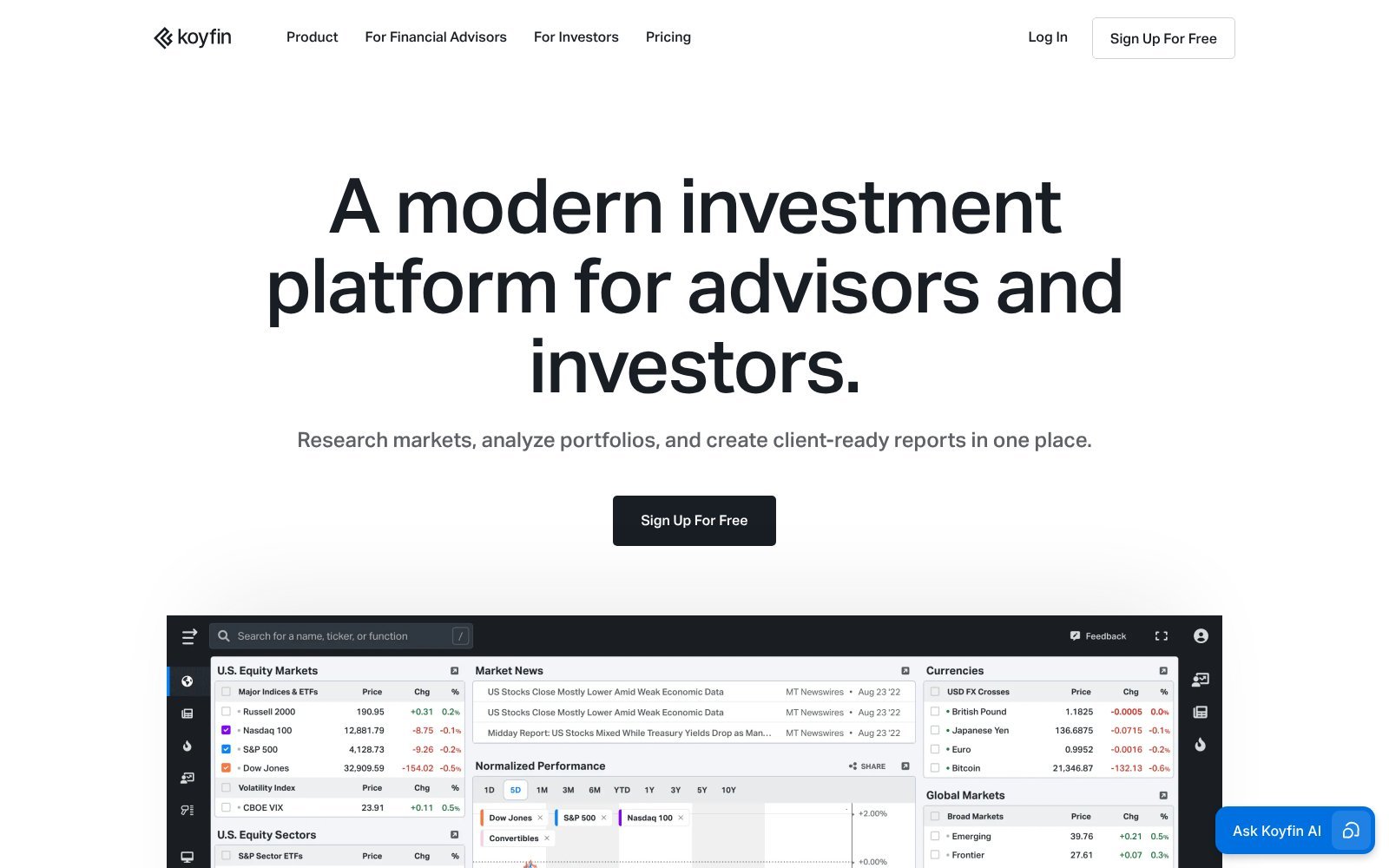
Its free plan includes 2 years of financial data and 1 year of estimates, which is enough to test the workflow. Plus costs $39 per month on annual billing and raises that to 10 years of financials and estimates with unlimited screens and watchlists.
Who Gets the Most From Koyfin
Investors who compare several companies at once, follow estimates closely, or track macro data alongside company results tend to use the most of Koyfin's workspace. Custom dashboards let a single screen show the metrics a particular investor checks every week.
What to Expect Before Paying
The amount of data and dashboard options means there is more to set up than in a simpler app. New users may need some time before the extra features save effort, so the free plan is the right place to start.
TradingView Is Best for Technical Analysis
TradingView is built around interactive charts, indicators, screeners, alerts, and multi-market monitoring. Its free Basic plan covers entry-level use.
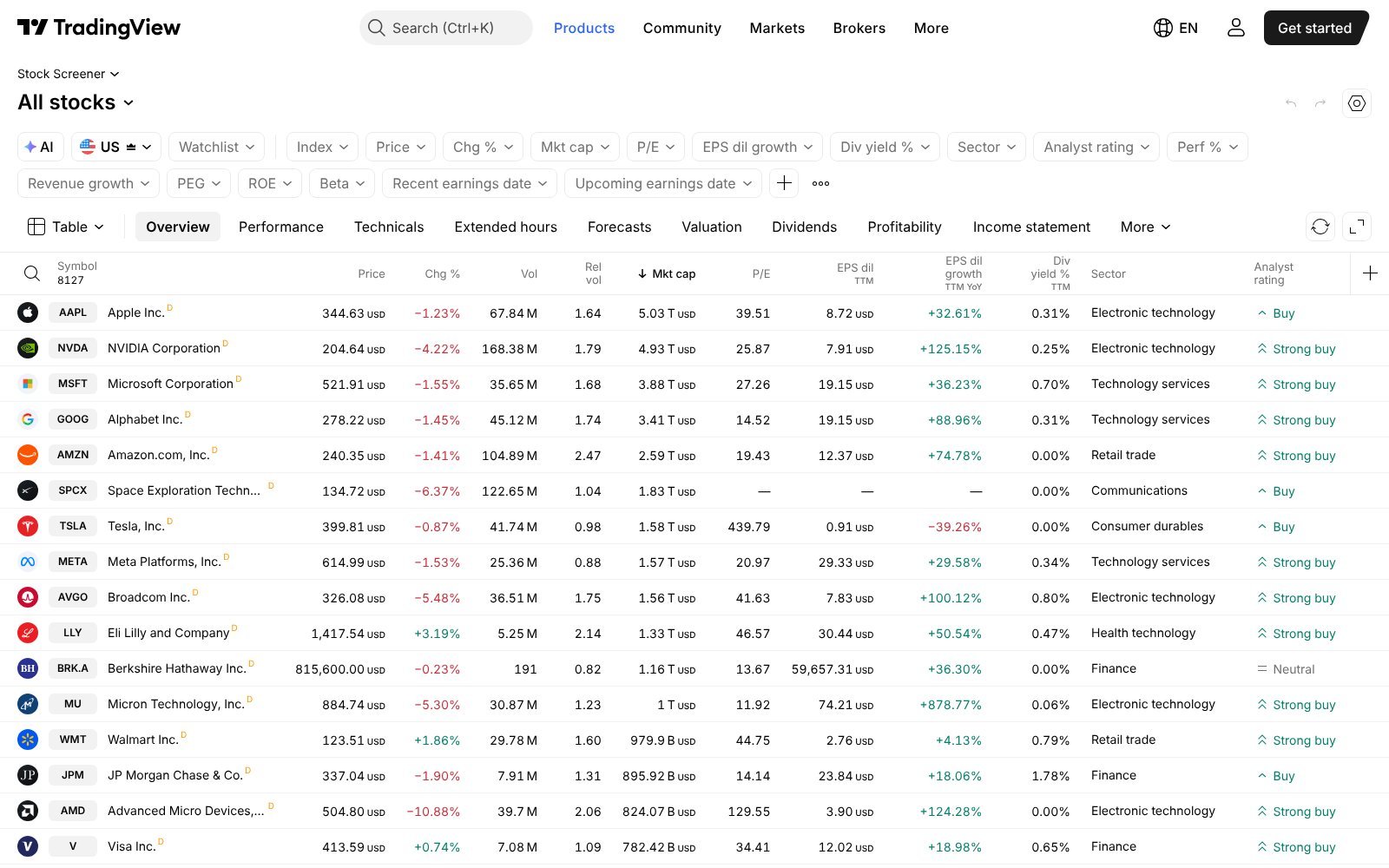
The app works particularly well for investors who move quickly between a screening condition and the underlying chart. The indicators those charts carry are explained in technical analysis for stocks. According to TradingView's pricing page, Essential costs $12.95 per month on annual billing, with higher tiers adding chart layouts, indicators, and alerts.
Why Chart-First Investors Choose It
A technical signal is easier to judge when the chart is on screen with the indicators that produced it. TradingView keeps screening, charting, and alerts in one place on desktop and mobile, so a trader can spot a setup and study it without switching tools.
What Fundamental Investors Should Know
TradingView includes fundamental data, but its defining strength is charting. Long-term investors who want many years of statements and estimates in one research workspace may still pair it with a second tool built around fundamentals. Using TradingView for charts and another app for statements is a common and practical split.
Yahoo Finance Is the General-Purpose Starting Point
Yahoo Finance remains one of the easiest apps for monitoring markets, following companies, building watchlists, reading news, reviewing quotes, and reaching basic financial data. Its screener states that it covers 50 regions. A fuller review of Yahoo Finance stock research covers what the free and paid plans include.
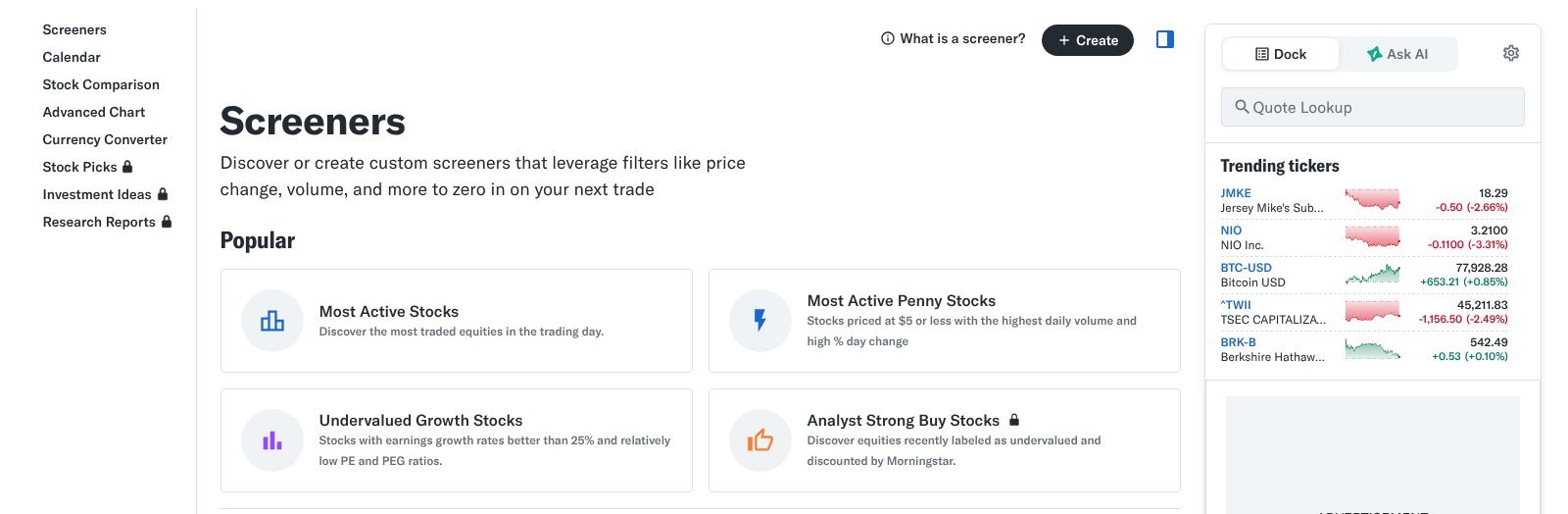
Paid plans are priced by the year. Bronze costs $95.40 per year, which works out to $7.95 per month, and Silver and Gold add more data and tools.
Why Many Investors Start Here
The free version puts quotes, news, statements, and watchlists in one familiar place. For an investor still learning which metrics to follow, that breadth is useful before committing to a specialist app for stock analysis with a narrower focus. The free version is often enough for months of everyday monitoring.
Where It Falls Short
Yahoo Finance is broad rather than deep. Investors who need long financial histories, custom formulas, or detailed technical work will find specialist platforms more capable, even though the free experience covers everyday monitoring well. Many investors keep Yahoo Finance for monitoring and add a specialist tool for research.
Simply Wall St Is Best for Visual Company Analysis
Simply Wall St uses visual reports to organize a company's valuation, growth, past performance, financial health, dividends, and risks into a single snapshot.
According to its plans page, the platform has 7 million investors and covers more than 120,000 stocks across more than 90 markets. A free plan is available, with paid plans adding more reports and portfolio features.
Why the Visual Approach Helps
Graphics make it easier to see where a company looks strong or weak at a glance. For newer investors, a visual report can show which part of the business deserves a closer look before reading the full financial statements behind it.
The Tradeoff
Summaries simplify. A visual score compresses many judgments into one picture, so investors should still check the underlying numbers and assumptions before drawing conclusions from a single chart or rating. Treating the snapshot as a starting point, rather than a verdict, keeps the visual format useful without letting it replace the work behind it.
Stock Analysis Apps Compared
The table compares each app by its main strength rather than by the length of its feature list.
| App | Best For | Free Access | Coverage | Main Strength |
|---|---|---|---|---|
| Stock Analysis | Fundamental data | Yes | 130,000+ stocks and funds in Pro | Low-cost long financial history |
| Koyfin | Professional-style research | Yes | Global | Dashboards, estimates, fundamentals |
| TradingView | Technical analysis | Yes | Global | Charts, alerts, indicators |
| Yahoo Finance | General research | Yes | 50 regions | News, quotes, portfolios |
| Simply Wall St | Visual fundamentals | Yes | 120,000+ stocks in 90+ markets | Visual company reports |
Price Counts Less Than Repeated Use
A cheap app is expensive if the investor never uses its premium features. Before paying, it helps to ask what the subscription will replace.
- Spreadsheet Work: Longer histories and downloads can remove hours of manual data entry each month.
- Missing Data: Estimates, filings, or long histories may not be available in a free tool.
- Monitoring: Alerts and portfolio tracking replace checking prices by hand.
- Consistency: Saved screens and dashboards make each review follow the same steps.
If none of these apply, a free app for stock analysis is probably enough for now.
How Each App Handles the Same Research Task
A useful way to compare apps is to run one real task through each of them. Take a single company and ask the same three questions in every app: how has revenue grown, how profitable is the business, and how is the stock priced today?
In Stock Analysis and Koyfin
Both apps open the company's financial statements quickly and show several years side by side. Stock Analysis presents the data in long tables with years of history, while Koyfin lets the investor build a dashboard that keeps the same metrics on screen for every company reviewed.
In TradingView and Yahoo Finance
TradingView answers the pricing question first, with an interactive chart and indicators, and shows fundamentals as a supporting panel. Yahoo Finance places quotes, news, and summary statements together, which makes it quick for a first look but less suited to detailed comparison across many years.
In Simply Wall St
Simply Wall St answers all three questions through a visual snapshot that scores valuation, growth, past performance, and financial health. It is the fastest way to see the overall picture, though the underlying numbers still deserve a check before any conclusion.
Questions to Answer During a Free Trial
Every app in this guide has a free plan or free tier. A short, structured trial shows more than any review, and it costs nothing but time.
Does It Show the Data You Check Most?
List the five metrics you look at for every company, then confirm the app shows each one without extra steps. An app for stock analysis that hides a key metric behind several clicks will slow down every review you do with it.
Can You Rebuild Your Watchlist Quickly?
Moving an existing watchlist into a new app should be simple. If it takes too long to add your current holdings and ideas, the app may not become part of a routine, however strong its data is. Checking import options early saves time later.
Does the Paid Plan Remove a Real Limit?
Note the moments when the free version stopped you. If the paid plan removes limits you met several times in a week, it may be worth paying. If the limits rarely appeared, the free version is probably enough for now.
Mobile Versus Desktop Research
Most investors use more than one device, and each app handles that differently. The difference shapes which app fits a daily routine.
What Works Well on a Phone
Phones suit quick checks: prices, news, alerts, and watchlist moves. TradingView, Yahoo Finance, and Simply Wall St all present this information clearly on a small screen, which makes them practical for monitoring during the day without opening a laptop. Alerts in particular are most useful on the device an investor carries all day.
What Needs a Larger Screen
Reading several years of financial statements, comparing peers, or building a dashboard is easier on a desktop. Stock Analysis and Koyfin show their full depth on a larger screen, so investors who rely on them for research often keep the phone for monitoring only.
Where the Data Comes From
Every app for stock analysis depends on underlying data from company filings, exchanges, and third-party providers. The same metric can differ slightly between apps.
Why Figures Sometimes Differ
Apps may calculate ratios using different periods, such as trailing twelve months or the last fiscal year, or treat one-time items differently. A P/E ratio that looks different in two apps may simply reflect different inputs rather than an error.
Checking Against the Filing
For any number that drives a decision, the company's own filing is the final source. Using an app to find the figure and the filing to confirm it is a simple habit that avoids acting on a data quirk. It takes only a minute per figure.
A Two-App Setup That Covers Most Needs
Many investors settle on a pair of apps rather than a single tool. The pairing works when each app covers a different part of research.
One App for Fundamentals
Stock Analysis or Koyfin can hold the long financial histories, ratios, and estimates used for deeper company work. This is the app opened when deciding whether a business deserves a closer look. It is where the slower, more careful work of reading statements and comparing companies takes place, usually on a larger screen.
One App for Monitoring
TradingView or Yahoo Finance can handle daily prices, charts, news, and alerts. This is the app checked during the day. Keeping the two roles separate avoids paying twice for the same data. Alerts set here can flag when a company on the research list reaches a price worth a closer look.
The Best App Depends on the Research Style
Fundamental investors are likely to get the most from Stock Analysis or Koyfin. Technical investors will usually prefer TradingView. General investors may find Yahoo Finance sufficient, and visual learners may prefer Simply Wall St.
Many investors end up with two tools: one for fundamentals and one for charts or monitoring. That combination works when each app solves a different problem rather than duplicating the same data. Whichever app for stock analysis an investor chooses, the app supplies the data. It does not replace understanding the business, reading the financial statements, and questioning the valuation assumptions behind a stock.
Frequently Asked Questions
What Is the Best App for Stock Analysis?
It depends on workflow. Stock Analysis favors fundamentals, Koyfin deeper research, TradingView charting, Yahoo Finance general monitoring, and Simply Wall St visual company reports for newer investors.
Which Stock Analysis App Is Best for Beginners?
Yahoo Finance and Simply Wall St are approachable starting points. Stock Analysis offers a clean path into deeper financial statements as an investor's research process develops over time.
Is TradingView Good for Fundamental Investors?
TradingView includes fundamental data, but its main strengths are charts, indicators, and alerts. Fundamental-first investors may prefer Stock Analysis or Koyfin for long financial histories and estimates.
How Much Does Stock Analysis Pro Cost?
Stock Analysis Pro costs $79 per year, about $6.58 per month, or $9.99 on monthly billing. It expands financial history, saved screeners, alerts, and daily downloads.
Do I Need More Than One Stock Research App?
Not necessarily. A second app helps only when it solves a different problem, such as pairing fundamental research with technical charting, rather than repeating the same market data twice.