
Yahoo Finance Stock Research: What the Free Tools Cover and When Premium Adds Value


Yahoo Finance stock research starts from one of the most familiar finance sites on the web. In one place it brings together quotes, historical prices, company financials, analyst estimates, screeners, news, watchlists, and portfolio tracking, and much of that remains free.
The paid tiers build on that base. Bronze focuses on portfolio tools, Silver adds Morningstar ratings and thousands of research reports, and Gold adds deeper historical data, exports, and advanced charts. This review explains what free Yahoo Finance stock research covers, what each plan adds according to Yahoo's own pages checked on October 15, 2026, and where a more specialized platform may fit better.
Key Takeaways
- Yahoo Finance's equity screener says its coverage "spans 50 regions," and a default United States screen showed 10,000+ results on October 15, 2026.
- The free experience includes quotes, news, historical prices, financial statements, estimates, screeners, watchlists, and portfolios.
- Bronze costs $95.40 per year, Silver $239.40, and Gold $479.40, equal to $7.95, $19.95, and $39.95 per month on annual billing.
- Silver is the main research upgrade, adding the Morningstar Rating for stocks and thousands of company research reports.
- Gold adds CSV downloads and about 40 years of financial statements.
- Yahoo Finance is strongest as a broad research hub rather than a specialized modeling or charting platform.
The Free Stock Screener Is Broader Than a Market-Movers List
Yahoo Finance's equity screener states that its coverage "spans 50 regions." On October 15, 2026, a default screen filtered to the United States showed 10,000+ results. That count changes daily as listings change.
Users can filter by region, market capitalization, price, sector, industry, and index, then add more filters. Results appear in a sortable table or a heatmap view, and Yahoo's help pages say users can create and save their own custom screeners.
Predefined Screens
Yahoo's screener hub offers ready-made lists for common ideas. Examples include Undervalued Growth Stocks, which Yahoo defines as stocks with earnings growth rates better than 25% and relatively low P/E and PEG ratios, as well as Aggressive Small Caps and Active Penny Stocks priced at $5 or less.
Saved Custom Screens
A saved screen turns a one-time search into a repeatable routine. An investor can build a filter set once, save it, and check the results each week to see which companies entered or left the list. That habit is often more useful than running a fresh search from scratch each time.
Company Pages Connect Price With Fundamentals and News
Yahoo's quote page help article lists the main tabs on each quote page. They include Summary, Chart, Statistics, Historical Data, Profile, Financials, Analysis, Options, and Holders.
That integration is the core of Yahoo Finance stock research. Analysis often moves back and forth between price and fundamentals, and Yahoo keeps both one click apart.
Financials and Analysis Tabs
The Financials tab shows annual and quarterly income statements, balance sheets, and cash flow data. The Analysis tab shows current and future estimates for earnings, revenue, and growth, along with earnings history, EPS trends, and EPS revisions. Together they give a quick view of past results and what analysts expect next. Reading those statements together is covered in stock analysis fundamentals.
Historical Data and Statistics
The Historical Data tab lets users view and download tables of historical prices, splits, and dividends. The Statistics tab shows financial highlights and trading information such as profitability, balance-sheet data, and dividends. These are useful for checking a trend or calculating a simple return without leaving the site.
Yahoo Finance Screeners Include Third-Party Research Signals
Some predefined screens draw on Morningstar research. Yahoo's screener hub lists Morningstar 5-Star Stocks and Undervalued Wide-Moat Stocks, which Yahoo describes as equities recently labeled undervalued by Morningstar with an economic moat that can last 20 or more years.
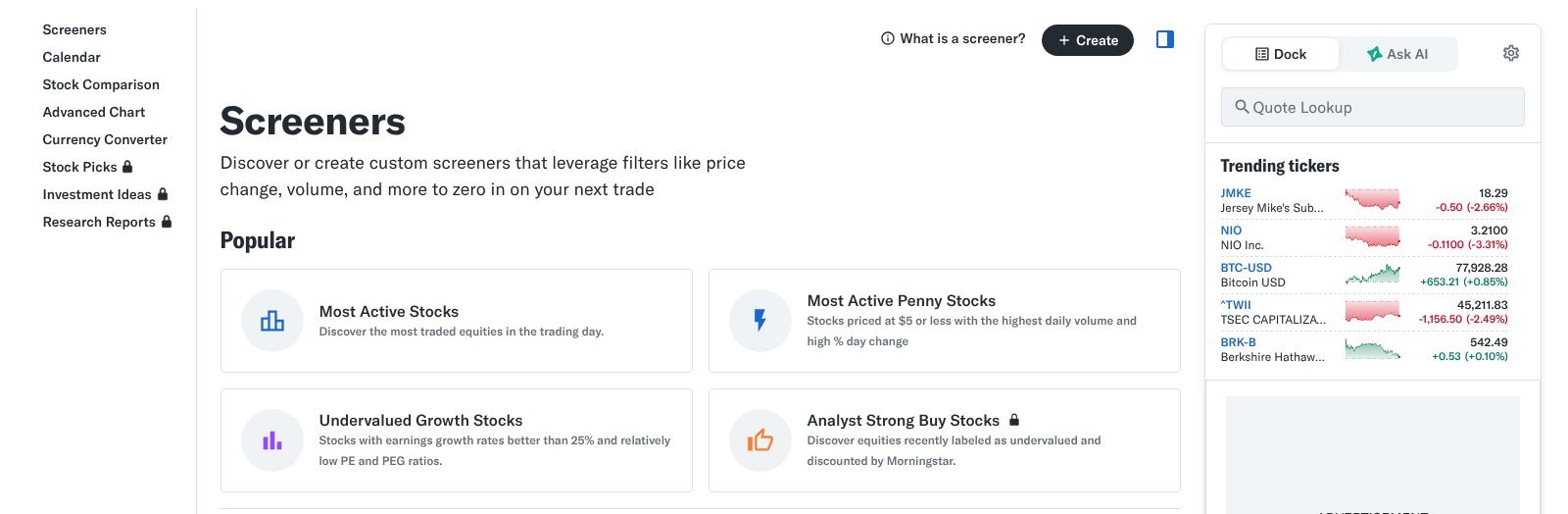
This brings research-based signals into the screening step itself. An investor can start from a list shaped by an outside research team instead of only raw financial filters.
What These Lists Offer
Research-driven lists save time when an investor wants ideas that have already passed an analyst's review. They also show how a professional research process frames value, using fair value estimates and competitive advantages instead of a single ratio like P/E.
Why They Still Need Checking
A screen built on someone else's rating inherits that rating's assumptions. Morningstar's fair value estimates depend on forecasts that can prove wrong. Checking the company's own filings, recent results, and debt load keeps a third-party label from replacing your own judgment.
Interactive Charts and Market Tools
Yahoo's help center describes interactive charts that let users compare multiple securities, analyze them with technical indicators, and change the chart period and scale. The same page lists an earnings calendar, market lists such as gainers and losers, Treasury rates, and a currency converter.
Earnings Calendar
The earnings calendar shows announcement dates and links to earnings conference calls. For investors tracking specific companies, knowing when results arrive helps plan when to review new numbers and estimate changes. It also explains sudden price moves that happen around report dates.
Portfolios and Watchlists
Yahoo lets users create portfolios and watchlists to track holdings and companies of interest. A watchlist built from screen results is a practical bridge between finding a company and studying it. It keeps candidates visible while the investor works through filings and research.
Yahoo Finance Paid Plans in 2026
Yahoo lists three paid tiers on its plans page. Prices below were checked on October 15, 2026 and can change.
| Plan | Annual Price | Monthly Equivalent (Annual Billing) | Main Addition |
|---|---|---|---|
| Bronze | $95.40 | $7.95 | Portfolio performance, volatility risk, diversification views |
| Silver | $239.40 | $19.95 | Morningstar Rating, research reports, fair value analysis |
| Gold | $479.40 | $39.95 | CSV downloads, about 40 years of statements, advanced charts |
Yahoo states annual savings of $24 for Bronze, $60 for Silver, and $120 for Gold compared with monthly billing. By our calculation, that implies monthly-billing prices of about $9.95, $24.95, and $49.95. Gold also lists a seven-day free trial.
Bronze Is Mostly a Portfolio Upgrade
Bronze focuses on portfolio performance tracking, monitoring volatility risk, visualizing diversification, community sentiment insights, and a subscriber-only daily newsletter. Yahoo's FAQ adds an ad-free experience and 24/7 account support.
Who Bronze Suits
Bronze fits investors who hold accounts in several places, such as a brokerage account, a 401(k), and an IRA, and want one view of performance and risk. Yahoo itself describes the plan as aimed at everyday investors tracking holdings across accounts in one place.
What Bronze Does Not Add
Bronze does not add the Morningstar Rating or the research reports. Investors upgrading mainly for deeper company research will not find those features at this tier, so the choice depends on whether portfolio tracking or company research drives the decision.
Silver Adds the Main Research Upgrade
Silver includes everything in Bronze plus expert stock picks, the Morningstar Rating for stocks, thousands of company research reports, model portfolio strategies and stock ideas, and fair value analysis with dividend scores. Yahoo's FAQ also says Silver adds a premium newsfeed.
Yahoo's research reports help page says the reports come from partners Morningstar, Argus, and Vickers. Reports can be filtered by date range, frequency, report type, and sector.
Report Types
The report types include daily market updates and summaries, monthly sector analysis, weekly stock picks, and insider activity reports that use Vickers data. That mix covers both single-company research and the wider market context around it, so a reader can move from a sector view down to one company in the same place.
When Silver Earns Its Cost
Silver makes the most sense for investors who will read research reports regularly and use fair value estimates as one input. If the reports become part of a weekly routine, the cost spreads across real use. If they go unread, the free tier covers most of the same daily needs.
Gold Is Harder to Justify for Casual Investors
At $39.95 per month on annual billing, Gold competes with more specialized research platforms. Yahoo lists CSV downloads of historical data, about 40 years of income statements, balance sheets, and cash flow reports, 50+ technical chart patterns, the AlphaSpace investment platform, and a Smart Money Screener.
Who Gold Suits
Gold fits investors who build their own models and need long, exportable histories of financial data. Yahoo describes it as aimed at active investors who want premium charts, smart screeners, and exportable data to power personal analysis. Casual investors rarely need that depth.
Coverage Limits to Note
Yahoo's plan FAQ says its premium features focus primarily on US equities and non-US equities traded on US exchanges. Investors researching companies listed only on foreign exchanges should test whether the paid data covers those names before committing to a full year.
Yahoo Finance Compared With Dedicated Research Platforms
No single platform covers every research need equally well. The table below compares Yahoo Finance with the kinds of specialized tools investors often consider, based on the features Yahoo lists on its own pages.
| Research Need | Yahoo Finance | Specialized Platform |
|---|---|---|
| Quotes and news | Broad and free | Comparable |
| Basic fundamentals | Strong on the free tier | Comparable |
| Global screening | 50 regions | Varies by platform |
| Technical charting | Indicators on interactive charts | Charting-first tools go deeper |
| Analyst research | Morningstar, Argus, Vickers on paid tiers | Dedicated research services go deeper |
| Long data exports | Gold tier | Varies by platform |
Yahoo Finance stock research works best as a hub where most daily needs are met in one place. If you are weighing it against other tools, a comparison of each app for stock analysis we reviewed covers five research apps by workflow and price.
A Sample Yahoo Finance Stock Research Routine
The routine below is one illustrative way to use the free tools in sequence. It shows how the pieces connect and is not a recommendation to act on any company it surfaces.
Step One: Screen and Save
Start with a clear question, such as profitable mid-size companies in one sector. Build a screen with region, market cap, sector, and a valuation filter, then save it. Add the most interesting results to a watchlist so they stay visible while you study each one in more detail.
Step Two: Study Each Company Page
For each company on the watchlist, read the Financials tab for revenue and cash flow trends, then the Analysis tab for estimate changes. Check the Historical Data tab for long-term price behavior and the news feed for recent events. This sequence turns a list of tickers into a short list of understood businesses.
Questions to Ask Before Upgrading
A paid plan earns its cost only if its features become part of a regular process. A few honest questions make that decision clearer before a full year is paid for.
Which Features Will You Use Weekly?
List the paid features you expect to open each week. If the answer is mostly portfolio tracking, Bronze may be enough. If research reports and fair value estimates would shape your decisions, Silver is the relevant tier. Features you would rarely open add cost without adding value.
Does the Free Tier Already Cover Your Needs?
Many investors find that quotes, financials, estimates, screeners, and watchlists already answer most of their questions. Using the free tier for a month and noting where it falls short gives a concrete reason to upgrade, rather than paying for Yahoo Finance stock research features on the assumption that more is better.
Using Yahoo Finance on Mobile
Yahoo Finance also runs as a mobile app, which Yahoo's plan FAQ says supports the ad-free experience for subscribers who sign in. The app keeps watchlists and portfolios in sync with the website, so research started at a desk can continue away from it.
Quick Checks on the Go
The mobile app suits fast tasks such as checking a quote, reading a headline, or reviewing how a watchlist moved during the day. These short checks help investors stay aware of events without opening a full research session each time something changes in the market.
Deeper Work on a Larger Screen
Financial statements, multi-year charts, and research reports are easier to study on a larger screen. Many investors use the app to flag companies and the website to study them. Splitting the work this way keeps quick monitoring separate from careful analysis.
Where Yahoo Finance Adds the Most Value
For Yahoo Finance stock research, market monitoring, screening, portfolio tracking, and research aggregation are the strongest uses. The free tier alone covers a large share of what many individual investors need each week.
One Place for Daily Research
Checking a quote, reading the news, scanning the financials, and reviewing analyst estimates can all happen on one page. That reduces the time spent moving between sites, which helps investors who check their holdings and watchlists regularly but do not need professional tools.
A Low-Cost Path to Research Reports
Silver gives access to Morningstar, Argus, and Vickers research for $239.40 a year. For investors who want outside research without a separate subscription for each provider, that bundle offers a single entry point into several research sources. It also keeps the reports beside the quotes and financials they discuss.
Where Yahoo Finance Is Less Complete
Investors who build detailed valuation models may need longer histories and structured exports, which sit on the highest tier. Traders who rely heavily on charting may prefer platforms built around charts first.
Detailed Modeling
Building a discounted cash flow model or a multi-year ratio study works best with clean, exportable data. Yahoo offers that on Gold, but some investors may find dedicated data platforms better suited to that work, especially if they need custom metrics or many companies at once.
Depth of Analysis
Yahoo aggregates research rather than producing a single deep research framework of its own. Investors who want one consistent research system with proprietary ratings throughout may prefer a platform built around that approach, where every screen and report follows the same method.
Free Yahoo Finance Is Enough for Many Investors
An investor who needs quotes, financial statements, estimates, news, watchlists, and basic screening can handle much of that without paying. That makes the free tier a strong starting point for Yahoo Finance stock research.
The case for upgrading grows when Morningstar research, fair value analysis, model portfolios, or enhanced portfolio analytics become recurring parts of the process. Testing the features you expect to use, and tracking how often you use them, is the clearest way to decide.
Frequently Asked Questions
Is Yahoo Finance Good for Stock Research?
Yes, for general research. It combines quotes, financial statements, estimates, news, screeners, and portfolios in one free platform, with deeper research on paid tiers.
Is Yahoo Finance Free?
Much of Yahoo Finance is free, including quotes, news, financial data, screeners, and watchlists. Paid tiers add research reports, ratings, portfolio analytics, and data exports.
How Much Does Yahoo Finance Premium Cost?
On annual billing, Bronze costs $95.40, Silver $239.40, and Gold $479.40 per year, as checked on October 15, 2026. Prices can change.
Which Yahoo Finance Plan Is Best for Research?
Silver is the main research tier. It adds the Morningstar Rating, thousands of research reports, fair value analysis, dividend scores, and model portfolio strategies.
Where Do Yahoo Finance Research Reports Come From?
Yahoo says its subscription research reports come from partners Morningstar, Argus, and Vickers, and can be filtered by date, frequency, report type, and sector.